Your Crypto Swap Quote Has a Clock: What the Timer Means
The rate on a crypto swap is tied to a specific moment in the market. Here is what the n.exchange timer means, why it matters, and what to do if it reaches zero before your deposit is detected.
You have selected a pair, entered an amount, and received a quote. Then you notice a timer counting down. Is the whole swap about to fail? Will your funds disappear if the clock reaches zero?
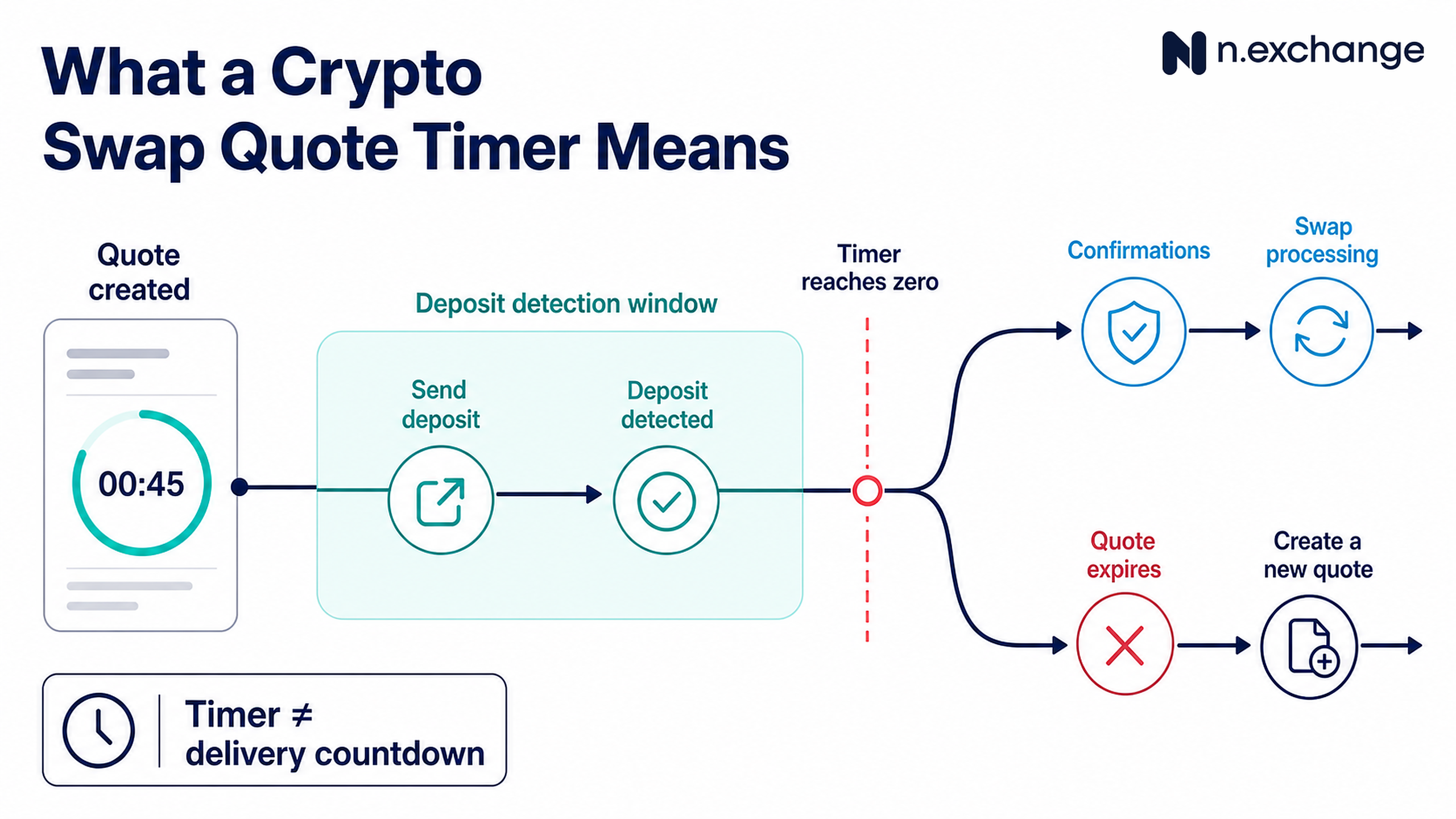
No. The timer is there because crypto prices and available liquidity change. It tells you how long the quoted terms remain available while n.exchange waits to detect your deposit.
A quote is a snapshot, not a permanent price
A swap quote uses the market conditions, route, fees, and available liquidity at the time it is created. Those inputs can change quickly. Keeping one quote open indefinitely would separate it from the market that produced it.
That is why a fixed-rate order has a payment window and a fixed-rate deadline. If your deposit is detected within that window and the order proceeds under its terms, the fixed quote forms the basis for the amount you are due to receive. The order page shows the relevant timer for your order.
A floating rate works differently. It does not store the same kind of price lock. The expected output can change with the live rate. Always read the rate option and amount shown in the widget before you create the order rather than assuming every quote behaves the same way.
What needs to happen before the timer ends
Creating an order is not the same as sending a deposit. After the order is created, n.exchange provides a deposit address. You still need to send the correct asset on the correct network to that address.
The important event is deposit detection, not the moment you press “Send in your wallet”.
A wallet may show that it has submitted a transaction while the transaction is still waiting to propagate or appear on-chain. Network congestion, a low fee, or a delay at the sending wallet or exchange can all affect detection.
Send only through the active order page and keep the order ID.
n.exchange assigns each order a unique reference, which you can use to return to the order and track it. Closing the browser does not stop a transaction that has already been sent.
What happens if the clock reaches zero
When the fixed-price timer expires before funds are detected, the price expires and the order is canceled. The practical next step, if you have not sent anything, is simple: create a new order and review the new quote.
Do not send to an expired order just because you copied its deposit address earlier. A new order may have different terms or instructions.
If you already sent the deposit but it was not detected before the timer ended, do not create a second payment. Save the deposit transaction hash and contact n.exchange support through the official site. The transaction hash gives support a precise on-chain reference to investigate.
The timer is not a delivery countdown
The payment window covers the quote and deposit-detection stage. It is not a promise that the entire swap will finish before the timer ends.
After the deposit is detected, the incoming transaction may still need blockchain confirmations. n.exchange then processes the exchange and broadcasts the outgoing transaction. The receiving network and your destination wallet or platform may require additional confirmations before showing the funds as available.
This is why two orders placed at the same time can progress at different speeds. They may use different networks, face different confirmation conditions, or follow different routes.
Before you continue
- Confirm whether the displayed rate is fixed or floating.
- Check the amount, asset, network, and payment window.
- Send only to the deposit address on the active order.
- Keep the order ID and your deposit transaction hash.
- If you already sent funds to an expired order, contact official support before doing anything else.
Ready to swap? Open the n.exchange widget, choose your pair, and review the live quote and timer before sending.
Frequently asked questions
What happens if a crypto swap quote expires?
If no deposit was sent, create a new order and review the new terms. If funds were already sent, do not pay again; keep the order ID and public transaction hash and contact official support.
Does the timer include blockchain confirmations?
Treat the order page as authoritative. The timer described here concerns the quote and deposit-detection stage, not a promise that all confirmations, processing, and destination crediting finish before zero.
Is a fixed crypto rate guaranteed?
Only under the displayed order terms, including its payment window, route, amount, and any applicable review. “Fixed” is not an unconditional guarantee outside those conditions.
What should I do if I sent funds before expiry?
Check the deposit TXID on the correct explorer, keep the order page, and avoid sending a second payment. Contact official support if the order does not update after the transaction state warrants it.
Summary
- Myth: the whole swap must finish before zero. Fact: the clock governs the quote and deposit-detection stage shown for that order.
- Use the live order page and the correct network explorer as sources of current state.
- Keep the order ID and relevant transaction hash. Avoid duplicate payments and unofficial support.
Next step: Use the n.exchange only after verifying the asset, network, amount, destination, live quote, and current terms for your route.