

Before you compare rates, clarify what “USDT20” means on the service you plan to use. The label may not identify the source network, and sending tokens on the wrong network or to an incompatible receiving address can put your funds at risk. Before you convert usdt20 to paxg, confirm the network holding your USDT and the network supported by your PAXG receiving wallet.
A displayed exchange rate doesn’t tell the whole story. Fees, minimum amounts, quote expiry, and transaction timing can all affect what arrives. PAXG is primarily an ERC-20 token, so if your USDT is on another network, confirm that the swap route supports your source network and specifies a compatible destination network before sending funds.
This guide covers a practical non-custodial process: check both networks, review the quote and transaction details, and track the swap through completion. You’ll also learn what to verify before confirming, including the receiving address and any stated route conditions. With a non-custodial swap, you provide a compatible destination address rather than depositing funds with an exchange, and retain control of your wallet.
Key Takeaways
- Check the actual network shown for USDT20; the label alone may not establish whether your USDT is on TRON or another chain.
- Before you convert usdt20 to paxg, confirm the selected PAXG network and make sure your receiving wallet supports it.
- Review the quote, minimum amount, fees, and any route conditions shown before sending funds.
- Use the step-by-step checklist to verify swap details and monitor transaction status.
- A non-custodial swap lets you exchange without handing an exchange custody of your funds, but network and transaction risks still apply.
Before You Convert USDT20 to PAXG: Confirm Both Networks
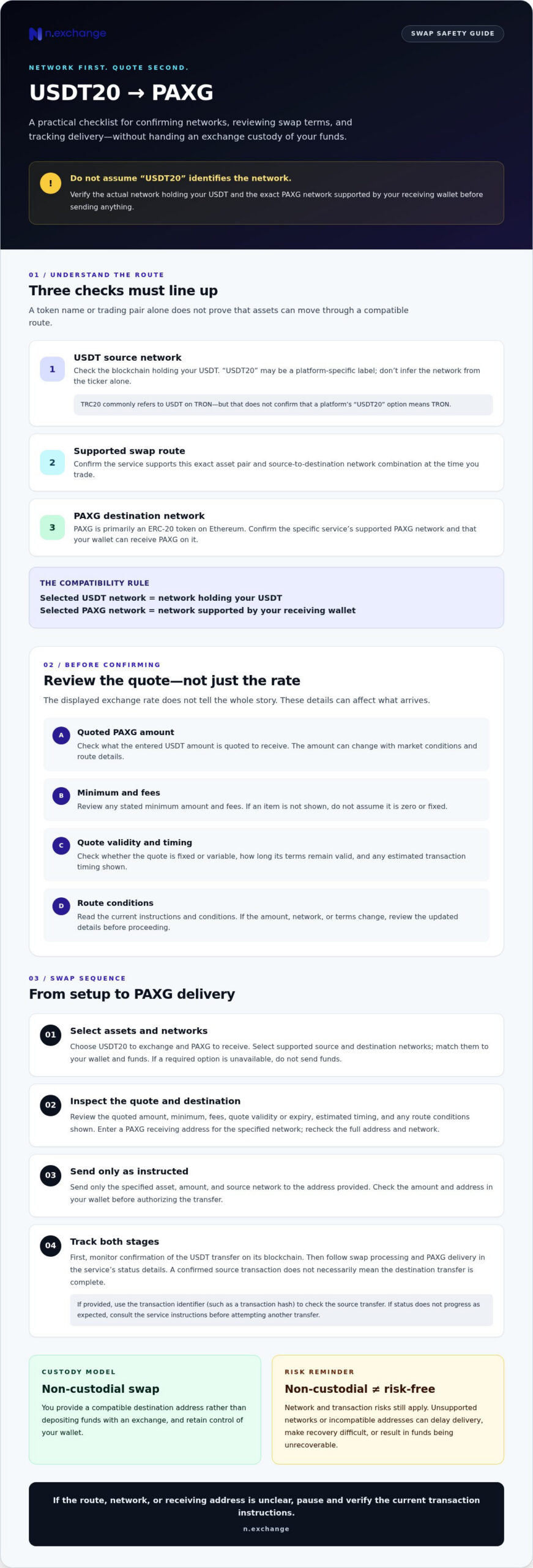
Before you convert usdt20 to paxg, identify the blockchain holding your USDT and the blockchain required by the swap route. “USDT20” isn’t a universal network standard. It may be a platform-specific label, so don’t infer the network from the ticker alone. Check the asset selector and the transaction instructions shown for the swap.
What USDT20 and PAXG Mean in This Swap
USDT is the token; its network is the blockchain on which that token exists. Tether (USDT) is a stablecoin issued across different networks. “TRC20” commonly refers to USDT on the TRON network, but that doesn’t confirm that a platform’s “USDT20” option means TRON. Verify the selected network in the swap interface and compare it with the network holding your funds.
PAXG, or Paxos Gold, is a gold-backed digital asset issued by Paxos. It is primarily an ERC-20 token on Ethereum, but confirm which PAXG network the specific service supports. A token name alone doesn’t establish a compatible route, and seeing a trading pair doesn’t guarantee that the assets move on the same blockchain.
Check Network Compatibility Before Sending
Match the source network selected in the swap to the network holding your USDT. Then check that your destination wallet supports PAXG on the exact network specified for receipt. For example, if your USDT is on TRON but the route requires another network, don’t send it unless the service’s instructions clearly support that source network. An Ethereum-compatible address alone isn’t enough: confirm that the wallet can receive PAXG on Ethereum.
- Source: Confirm the selected USDT network matches the network holding your tokens.
- Destination: Check the PAXG network and receiving address before submitting the transaction.
- Route: Verify the service supports this exact asset pair and network combination at the time you trade.
Sending tokens over an unsupported network or to an incompatible address can delay delivery or make recovery difficult, and funds may be unrecoverable. Don’t rely on matching token symbols or familiar-looking addresses. Verify each network in the transaction details. If the route or receiving network is unclear, pause and check the service’s current instructions.
How to Convert USDT20 to PAXG Step by Step
Once you’ve confirmed which network holds your USDT, use the swap service’s current instructions as your guide. Interface wording can change, so follow the asset and network options actually displayed rather than relying on a remembered button name. If USDT20, PAXG, or your required network isn’t available, don’t send funds.
Create and Review the Swap Quote
Choose USDT20 as the asset you’re exchanging and PAXG as the asset you want to receive. Select the supported source and destination networks, then enter the amount. Before proceeding, confirm the source network matches your USDT and the destination network matches your receiving wallet.
- Check availability: Make sure the exact asset pair and network combination are supported in the current interface.
- Review the amount: Check the PAXG amount quoted for the USDT entered. It can change with market conditions and route details.
- Inspect the terms: Review any displayed minimum, fees, quote validity or expiry, and estimated timing. If an item isn’t shown, don’t assume it is zero or fixed; consult the service’s current transaction instructions.
- Enter the destination: Provide a receiving address for PAXG on the specified network. Recheck the full address and network before confirming.
Check whether the quote is fixed or variable and how long its terms remain valid. If the amount, network, or conditions change before you proceed, pause and review the updated details rather than relying on the earlier quote.
Send USDT and Track the Transaction
After accepting the instructions, send only the specified asset to the address provided, using the exact source network shown. Check the amount and address carefully in your wallet before authorizing the transfer. Sending a different token or using another network can prevent the service from processing the swap as expected.
Monitor two stages: confirmation of your USDT transfer on its blockchain, followed by processing of the swap and delivery of PAXG. A confirmed source transaction doesn’t necessarily mean the destination transfer is complete. Use the transaction identifier, such as a transaction hash if one is provided, to check the source transfer. Then follow the service’s displayed status details for the swap. If the status doesn’t progress as expected, refer to the service’s instructions before attempting another transfer.
With a non-custodial exchange, you provide a compatible destination address and retain control of your wallet. If you’re ready to convert usdt20 to paxg, use the current USDT20-to-PAXG swap options to verify the pair, networks, quote, and transaction conditions before sending.
USDT20-to-PAXG Swap Quotes: Rate, Fees, and Route Checks
A quote shows the amount of PAXG offered for the USDT amount you enter at a particular moment. It’s time-sensitive: market movement, available liquidity, and the time taken to submit and process a transaction may affect the final amount. Before you convert usdt20 to paxg, check whether the displayed estimate is fixed or variable. Don’t assume it’s locked unless the live interface explicitly says so and explains the relevant conditions.
What Changes the Amount of PAXG You Receive?
The quoted amount can reflect the exchange rate and route details available when you request it. Market changes and liquidity may affect that rate, while network and processing conditions can affect completion time. Compare the amount you expect to receive with the amount shown immediately before confirming. If the quote updates, review the revised terms instead of relying on an earlier estimate.
Review Minimums, Fees, and Quote Conditions
Read each line of the live quote carefully. Network fees relate to blockchain transactions and can vary by network and transaction conditions. Treat a service fee or spread as a separate item only if the interface identifies it. Confirm the minimum amount and any route restrictions shown for your selected assets and networks. Don’t assume an unlisted cost is included or absent.
| Quote detail | What to check before proceeding |
|---|---|
| Estimated PAXG amount | Confirm the amount shown for your entered USDT and selected route. |
| Displayed fees | Review each identified network or service fee; don’t combine separate items without confirmation. |
| Minimum amount | Check that your input meets the current minimum for this pair and route. |
| Rate conditions | Look for whether the quote is fixed or variable, and note any stated expiry or update conditions. |
| Estimated timing | Review the displayed estimate, understanding that blockchain confirmation and swap processing can affect completion. |
Use the live interface as the authority for current quote terms. Minimums, fees, timing estimates, and route availability can differ, so don’t rely on figures from an older quote or a general rate calculator. If an important condition isn’t clearly shown, check the service’s current instructions before sending USDT.
A non-custodial swap differs from a custodial exchange in how funds are handled. For more context on that distinction, read this non-custodial crypto exchange guide. Whatever the custody model, review the quote and network details before confirming; a rate estimate doesn’t remove market or transaction risk.
Avoid Common USDT20-to-PAXG Transfer Errors
Many preventable swap problems start with a mismatch: the wrong source network, an incorrect receiving address, a wallet that can’t support PAXG on the specified network, or an amount below the route’s minimum. Before sending, check that the instructions match your wallet and the network you’ve selected. If any detail conflicts, stop and verify it rather than guessing.
Prevent Network and Wallet Mismatches
Check that your wallet can receive the exact PAXG token on the network specified by the swap, not simply that it supports the address format. Copy the receiving address from the intended wallet and compare it with the address entered in the swap interface. Before authorizing a transfer, confirm the source asset, source network, destination asset, destination network, receiving address, and minimum amount.
A small test transfer may help confirm the route when the service supports it and the amount is practical, but it can incur additional network or transaction fees. Check the minimum first: a test amount below the route’s minimum may not be processed as intended. A test doesn’t guarantee that a larger transfer will complete without issue.
Blockchain transactions are generally difficult to reverse once confirmed. A transfer to an unsupported network or incorrect address may be delayed or unrecoverable, so verify every field before sending.
What to Do if a Swap Is Delayed
First, check whether the USDT transfer has received the required confirmation on its source blockchain. A confirmed source transaction and a completed swap are separate stages, so a delay doesn’t by itself mean the swap has failed. Use the transaction hash to inspect the source transfer, then check the swap service’s transaction status. Follow its listed support process if the status remains unclear.
Keep the transaction hash and relevant status details available when seeking help. Don’t send the funds again unless the service’s instructions specifically direct you to do so. Recovery depends on the circumstances and isn’t assured. For broader context on evaluating these risks, see this counterparty risk framework.
Before you convert usdt20 to paxg, check the asset, network, address, and minimum, then review the live transaction instructions. If the displayed route matches your wallet and requirements, you can review the available swap options before deciding whether to proceed.
Complete the USDT20-to-PAXG Swap with a Non-Custodial Exchange
A successful swap depends on more than selecting two asset names. Before you convert usdt20 to paxg, confirm the exact pair and network route are available, your wallet can receive PAXG on the specified network, and the quote and transaction instructions match your plans. Availability and route details can change, so check them on n.exchange when you’re preparing the transaction.
What Non-Custodial Means for This Swap
n.exchange provides non-custodial crypto swaps designed not to hold user funds. You supply a compatible receiving address and follow the transaction instructions for the selected route. This exchange model is distinct from a custodial wallet service or direct fiat banking. It doesn’t remove your responsibility to use the correct networks, protect your wallet, and review each transaction before confirming.
Non-custodial does not mean risk-free. Network congestion, market movement, an incorrect address, or an unsupported route can still affect a transaction. Check the displayed status and terms, and don’t assume a transaction can be reversed after it’s confirmed on a blockchain.
Final Checks Before You Exchange
Use this final readiness check before sending funds:
- Pair and route: Confirm USDT20 and PAXG, along with the exact source and destination networks, are currently supported.
- Wallet: Make sure the destination wallet can receive PAXG on the selected network and that the address is correct.
- Quote: Review the expected PAXG amount, displayed fees, minimum, rate conditions, and estimated timing. Check whether the quote is fixed or variable as stated in the live interface.
- Instructions: Confirm the deposit details, amount, and transaction conditions before authorizing a transfer.
If any detail is missing or doesn’t match your wallet, pause and verify the current route rather than sending funds. A non-custodial process means the exchange doesn’t hold your funds, but it doesn’t eliminate market or transaction risks. Proceed only when the pair, networks, address, and quote all align.
After completing these checks, you can start a swap on n.exchange and review the live USDT20-to-PAXG options before deciding whether to proceed.
Make Your Final Checks Before You Swap
A reliable swap starts with clear network information. Before you convert usdt20 to paxg, confirm the actual USDT network and the PAXG destination network. Then make sure your receiving wallet supports the exact token on that chain. Asset names alone aren’t enough to establish compatibility.
Review the live quote before sending. Check the expected PAXG amount, displayed fees, minimum, quote conditions, and transaction instructions. Rates and route details can change, so rely on the terms shown for your transaction rather than an earlier estimate. Keep the transaction identifier available and track source-chain confirmation separately from swap completion.
n.exchange provides non-custodial crypto exchange services focused on direct digital-asset swaps without holding user funds. That model doesn’t remove market or transaction risks, and you should confirm the exact pair and networks before proceeding. If the route is available and the details match your wallet, check the available USDT20-to-PAXG route on n.exchange.
Take time to verify each detail. A careful review helps you make an informed swap decision.
Frequently Asked Questions
Does USDT20 mean USDT on the TRON network?
Not necessarily. “USDT20” can be a platform-specific label, so check the network selector and transaction instructions rather than assuming it means TRON. TRC20 commonly refers to USDT on TRON, but labels can vary between services. Before sending, confirm the network holding your USDT and make sure it matches the swap’s specified source network. If the interface is unclear, pause and verify the route.
Can I convert USDT20 to PAXG directly?
You can convert USDT20 to PAXG directly only if the swap service currently supports the exact asset pair and selected source and destination networks. Check those details in the live interface before proceeding; availability can depend on the route. If the service provides a quote, review the receiving amount, fees, minimum, and conditions, then follow the displayed instructions. Don’t send USDT to an address or network the service hasn’t specified.
How do I check which network my USDT is on?
Check the asset details in the wallet or platform where your USDT is held. Look for the network name, such as TRON, Ethereum, or BNB Smart Chain, and compare it with the network selected in the swap instructions. The token symbol alone may not identify the blockchain. If you’re unsure, check the original transaction details or ask the wallet or platform provider before initiating a transfer.
What wallet can receive PAXG from a USDT20 swap?
Use a wallet that supports PAXG on the exact destination network specified by the swap service. PAXG is primarily an ERC-20 token on Ethereum, but confirm the supported network for the route and ensure your wallet can receive that token there. Verify the full address before submitting it. A wallet that supports a familiar address format doesn’t necessarily support every token or network associated with that address.
How much PAXG will I receive for my USDT20?
The amount depends on the live quote for your entered USDT amount and selected route. Check the PAXG amount displayed before confirming, along with any identified fees, minimum, and quote conditions. Rates can change with market conditions and transaction timing, so don’t rely on a remembered or previously displayed estimate. The live interface is the reference for the terms shown for your specific transaction.
How long does a USDT20-to-PAXG swap take?
Timing varies by route and network conditions. The source transaction must first receive blockchain confirmation, then the swap must be processed and PAXG delivered on the destination network. Check the service’s current estimated timing and transaction status rather than assuming these stages happen at once. If the transfer is confirmed but the swap remains in progress, use the transaction identifier and the service’s stated instructions to track it.
What happens if I send USDT on the wrong network?
A transfer sent on an unsupported network may be delayed, fail to process as expected, or become unrecoverable. Blockchain transactions are generally difficult to reverse once confirmed, and recovery isn’t assured. Check the source network, destination instructions, asset, and address before authorizing a transfer. If you’ve already sent funds, locate the transaction hash and follow the service’s listed support process. Don’t send another transfer unless instructed.


